Hardware Preparation (Vue 3)
Opening the case
Disassembly is fairly straightforward. Remove all the screws from the bottom, and possibly loosen the SMA connector a bit. Then you should be able to pop the two halves of the plastic case open, carefully with a pry tool or similar.
Connecting UART
Do not connect 5V or 3.3V at this time.
Once inside, there are five test point pads involved to flash the Vue 3:
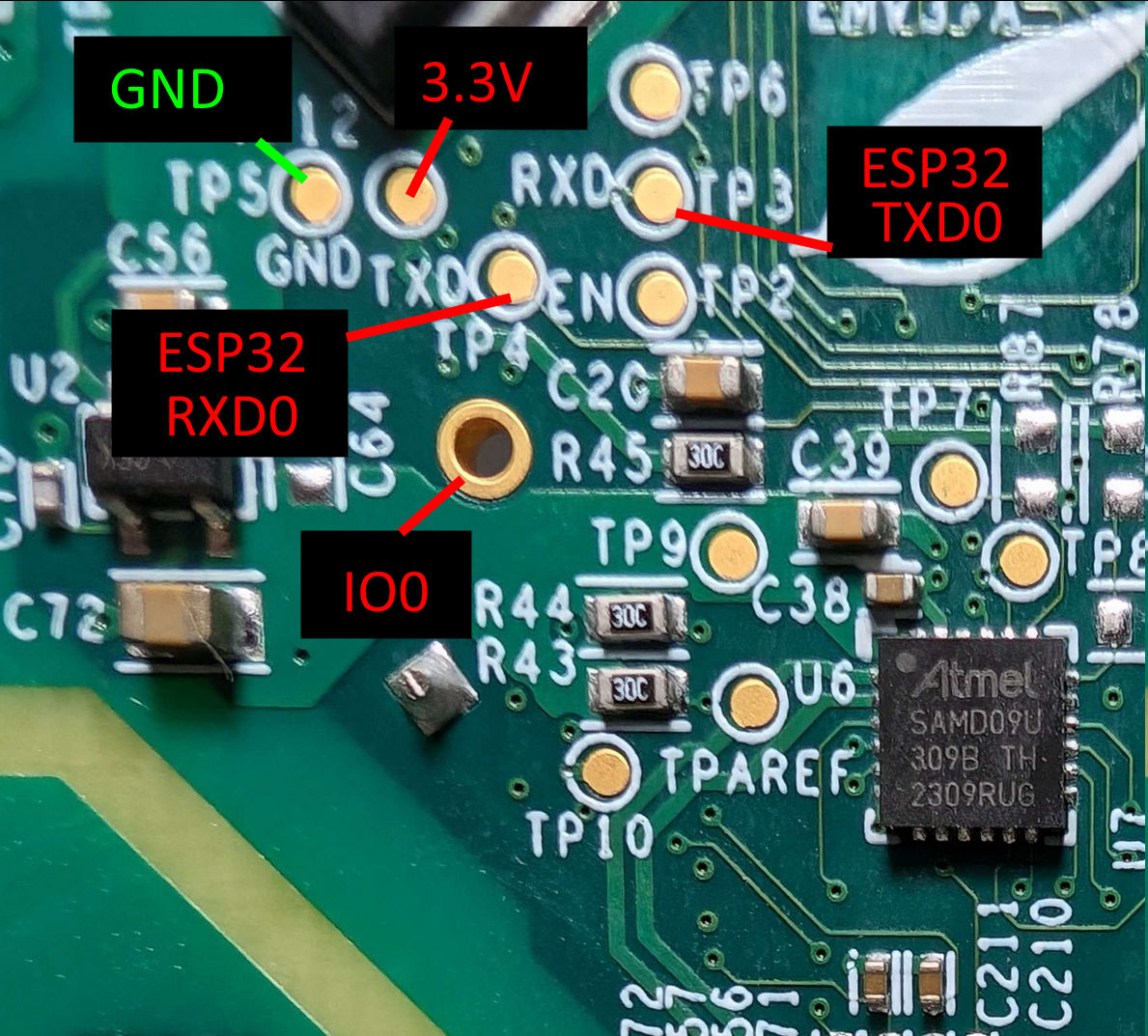
See the original thread for additional tips/instructions.
Connect your USB serial's RX pin to the test point the board labels as RXD/TP3 (this is actually the ESP32's TXD0 pin) and your serial's TX pin to the test point the board labels TXD/TP4 (this is actually the ESP32's RXD0 pin).
Connect the USB serial's GND to the board's GND/TP5. Connect the plated through-hole "ring" (labeled IO0 in the picture, no label on the board itself) to ground with a jumper wire.
Connect power
Do not mix up 5V and 3V, or you will destroy your board.
All that's left to enter bootloader mode is to power the ESP32 via the 3.3V test point (labeled in the picture, next to GND/TP5 on the board).
Because you have either taped down IO0 to ground or are using the DTR/RTS pins, your board is now in bootloader mode, and you can now backup software off of it and load new software on.